2026 ASVAB Practice Test Prep
- 4.3
- Rating
- 10.00K
- Installs
- Free
- Price

 Analysis by App-foxy
Preparing for the ASVAB can feel difficult for a very practical reason: the exam covers several different kinds of thinking, so a study session can quickly become unfocused. 2026 ASVAB Practice Test Prep is an education app built around that preparation problem. I found it most useful as a compact practice companion rather than as a complete replacement for official guidance, classroom help, or a carefully organized study plan.
The app is free to install, carries an Everyone age rating, and is made by UNISOFT VIET NAM TECHNOLOGY JOINT STOCK COMPANY. Its store summary promises help with passing the Armed Services Vocational Aptitude Battery, while the short description keeps things simple: ASVAB Practice Test. That tells you the central purpose, but not the more important question: whether it fits the way you actually study.
My answer is yes, especially if you need regular question practice in short sessions. I would be more cautious if you expect a full course with extensive explanations, personal tutoring, or a guaranteed path to a particular military job. The app works best when I treat it as a tool for identifying weak areas and building exam familiarity.
You May Also Like

 Blood Strike: 2.5 Anniversary
Blood Strike’s Loadouts Turn Every Drop Into a Tactical Gamble
A close look at Blood Strike’s custom loadouts: how fast access to signature weapons reshapes its battle royale rhythm, rewards preparation, and narrows the gap between fights.

 Pandora - Music & Podcasts
Pandora’s Music Is Easy to Start, but Harder to Recover
Pandora’s strength is its low-effort path from a seed to a station. Its weak spot is how much confidence it asks you to place in connection, setup, and quiet recovery.

 8 Ball Pool
 Is Built on Rivalries, Rematches, and Routine
A close look at the rivalries, rematches, shared routines, and unanswered safety questions that turn a quick pool match into a persistent mobile community.

 Samsung Music
’s Quiet Strength Is Playing What You Already Own
Its reach comes less from spectacle than from dependable access to a personal library. That simplicity is both the app’s strongest retention engine and its ceiling.

 AccuWeather: Weather Radar
AccuWeather Review: A Quick, Clear Forecast for Everyday Decisions
For everyday plans, the best forecast is the one you can understand quickly. AccuWeather makes rain timing, radar, and local conditions easy to act on, with a few trade-offs.

 Hill Climb Racing
Why Hill Climb Racing Still Turns Crashes Into One More Run
A tiny car, a bumpy hill and one more upgrade: Hill Climb Racing keeps resurfacing because its simple chaos makes every near-miss feel personal.
More From Our News Desk
View All News


Where preparation usually gets stuck
The first obstacle is often not a lack of effort. It is choosing the wrong study activity. Reading general advice about the ASVAB may make me feel productive, but it does not necessarily reveal whether I can solve arithmetic, vocabulary, or mechanical questions under pressure. A practice-test app is valuable because it turns preparation into decisions: answer, review, classify the mistake, and return to the topic later.
That workflow matters more than simply completing a large number of questions. If I guess correctly and move on, I may mistake luck for knowledge. If I miss a question and only memorize the answer, I may fail when the wording changes. I recommend keeping a small mistake log beside the app. I write down the subject, the reason for the error, and the rule or method I should have used. This makes each session more useful than passive repetition.
A second sticking point is uneven preparation. Someone may be comfortable with vocabulary but struggle with arithmetic reasoning, or enjoy general science while avoiding mathematics. A mixed practice session can expose that imbalance, but it can also hide it if I only look at my overall result. I pay attention to patterns: repeated calculation errors, unfamiliar terms, rushing, or misunderstanding what a question is asking.
One realistic use case is a student with a part-time job who has only a short window before leaving for work. Instead of opening a long lesson and abandoning it halfway through, the student can use the app for a focused practice block, mark the questions that caused hesitation, and review those mistakes later. The point is not to turn every spare minute into studying. It is to make small sessions deliberate.
The app also helps users who are tired of collecting scattered resources. Switching between random web pages, handwritten notes, and unrelated videos can make it hard to know what has actually been covered. A dedicated ASVAB practice app gives the routine a center. Still, I would not assume that opening it automatically creates a balanced plan. I have to decide which areas need attention and when to stop.
How I would use the first session
I would begin with a calm diagnostic session rather than trying to achieve a perfect result. I answer without looking up solutions, note where I hesitate, and separate careless mistakes from genuine gaps. A wrong answer caused by rushing needs a different remedy from a wrong answer caused by not understanding a formula.
After that first session, I would choose one narrow target for the next visit. For example, I might focus on arithmetic word problems instead of mixing every possible subject. This creates a clearer feedback loop. The app supplies practice, while my notes explain why the result changed or failed to change.
A useful but easy-to-miss habit is to read every question twice when the wording feels awkward. ASVAB-style questions often test interpretation as much as calculation. Rushing into the numbers can lead me to solve the wrong problem. I also avoid checking an explanation immediately after every uncertain answer if I am trying to simulate test conditions. I finish the small set first, then review.
Setup checks before blaming the app
The current version is 1.3.4, and it supports devices running Android 7.0 or later. That makes compatibility a simple first check for Android users. If the app will not install or behaves strangely, I would first confirm the device software, available storage, and whether the installation completed properly before assuming the practice content is at fault.
Because the application is free to install, it is easy to start without a financial commitment. The listing also includes optional in-app purchases ranging from $9.99 to $79.99 per item. I would pay attention to what is available without buying anything and only consider an upgrade after using the free experience long enough to decide whether its study style suits me. A purchase should solve a clear need, not compensate for an unfocused routine.
On a new installation, I would keep the first launch simple. I would open the app on a reliable connection, allow screens to finish loading, and avoid repeatedly tapping buttons if a page takes a moment to respond. If a test seems incomplete, I would exit normally and reopen the app before starting the same session several times. Repeatedly restarting during a slow load can make it harder to tell whether the issue is temporary or connected to the session itself.
I also recommend checking the device’s basic conditions before studying: battery level, screen readability, and notification interruptions. These are not glamorous details, but they affect practice quality. A question missed because a notification covered part of the screen is not useful evidence about ASVAB readiness. I prefer a quiet setting and a screen large enough to read word problems comfortably.
Another practical check is expectation setting. This is an education app, not a substitute for confirming registration details, eligibility questions, testing arrangements, or official score requirements. I use it for preparation practice. For decisions that affect enlistment or job options, I would consult the appropriate official source or a qualified recruiter rather than relying on an app answer.
The app has an average rating of 4.3 from more than three hundred ratings, with dozens of written reviews and over ten thousand installs. Those figures suggest that it has found an audience, but they do not guarantee that every learner will like its pacing or coverage. I treat the rating as a reason to try it, not as proof that it matches my personal study needs.
Small setup choices that improve the experience
I would keep a notebook or digital note open before beginning. The best use of a practice app is not merely recording right and wrong answers. It is building a personal list of recurring problems. I label each mistake with one of three causes: knowledge, interpretation, or timing. After several sessions, that classification tells me whether I need to study a concept, slow down, or practice under a time limit.
I would also avoid starting with a long session late at night. Fatigue creates misleading results, especially in arithmetic and reading questions. A shorter, attentive session is better than a large set completed while guessing. If I notice that I am selecting answers without reading the full question, I stop and record that as a timing or concentration issue instead of continuing for the sake of a higher question count.
For learners sharing a device with family members, I would make sure the right person is using the app before beginning a serious session. Even when a practice result is not formally important, mixing one person’s notes or progress habits with another’s can make the feedback confusing. A consistent routine is more valuable than an impressive-looking isolated attempt.
Recovering when a study session goes wrong
When a practice session feels unhelpful, I do not immediately conclude that the app has failed. First, I identify the type of problem. Did the app fail to open, or did I simply perform badly? Did a question appear unclear, or did I read it too quickly? Did I lose concentration because of the environment? Each answer leads to a different recovery step.
If the application freezes or a screen does not respond, I would close it, reopen it, and try a fresh session rather than repeatedly pressing the same control. I would also check whether other apps are behaving normally and whether the device has enough free space. If the problem continues, updating the device software or reinstalling the app may be reasonable, but I would first protect any notes I have made outside the app. I would not erase an installation casually if I have not recorded my study history elsewhere.
If a session feels too difficult, I would resist the temptation to search for answers while taking it. Instead, I finish what I can, then revisit the missed questions. Looking up a solution during the attempt turns practice into an open-book exercise and makes the result difficult to interpret. The recovery is to separate testing from learning: attempt first, review second, and retest later.
When the same topic causes trouble repeatedly, I use a three-step reset. First, I explain the question in my own words. Second, I write down the operation or principle involved. Third, I solve a similar example without looking at the previous answer. This approach is especially useful for word problems, where the main challenge may be translating language into a calculation.
A different recovery is needed when I keep answering correctly but still feel uncertain. That usually points to recognition without confidence. I slow down and explain why the chosen answer is right and why the alternatives are wrong. If I cannot do that, I count the item as needing review even if the result was technically correct.
Another useful technique is to repeat a weak area on a different day rather than immediately repeating the same questions. Immediate repetition can reward short-term memory. Waiting creates a more honest check of whether I understood the method. I would rather see a modest result that reflects durable learning than a perfect result produced by remembering the previous screen.
Turning mistakes into a weekly routine
I would organize the week around three kinds of sessions. The first is a diagnostic session that samples several areas. The second concentrates on one weakness identified by the first session. The third returns to mixed practice to see whether the improvement transfers when the subject changes unexpectedly.
This pattern prevents a common mistake: studying only what feels comfortable. If I enjoy vocabulary questions, I may spend most of my time there and neglect mathematics. A mixed session acts as a reality check. If the app does not provide the exact balance I want in one sitting, I can create that balance by alternating focused and mixed sessions myself.
I also set a stopping rule. I stop when my attention drops enough that I am guessing, not when I reach an arbitrary number of questions. This is a better safeguard against false confidence. The aim is to learn from the practice, and exhausted guessing produces poor information.
When the app is not the cause
Not every disappointing result is a technical problem. Some users may expect an app labeled for the 2026 ASVAB to function like a complete official preparation program. I would not use it that way. Practice questions can improve familiarity and expose weak points, but they do not replace understanding the test process, checking current official instructions, or asking a knowledgeable person about personal eligibility and career choices.
The app may not be the right choice for someone who needs detailed teaching from the beginning. If I do not understand fractions, ratios, basic algebra, or common vocabulary, repeated testing alone can become frustrating. In that situation, I would pair the app with a textbook, teacher, tutor, or structured course that explains the underlying material. The practice app can then check whether the lesson has become usable.
It may also be a poor fit for a learner who needs accessibility options, a very specific study format, or extensive progress analytics. I would test the reading comfort and navigation early rather than assuming every educational app handles those needs equally well. If the screen, wording, or interaction style makes practice tiring, a different resource may be more effective even if this app is popular.
Users who want official certainty should be especially careful. A practice result is not the same as an official score, and confidence inside an app does not determine qualification for a military role. I use the app to prepare questions for later conversations, not to make promises about outcomes.
There is also a trade-off between convenience and depth. A mobile practice tool is easier to open during a break than a large study book, but convenience can encourage shallow sessions. I get the most from it when I deliberately choose a topic, review errors, and return later. Someone who wants to sit through long, fully explained lessons may prefer a course designed around instruction rather than question practice.
The developer, UNISOFT VIET NAM TECHNOLOGY JOINT STOCK COMPANY, presents the product within the education category, and the Everyone rating makes it approachable for a broad audience. Even so, broad accessibility does not mean the content will feel equally suitable for every learner. A person already scoring strongly may need more advanced, targeted material, while a beginner may need more explanation than a practice-focused app can provide.
My practical verdict after using it as a study companion
I recommend 2026 ASVAB Practice Test Prep to learners who want a straightforward way to add regular question practice to their routine. Its strongest role is diagnostic: it helps me discover where I hesitate, test whether a study method worked, and become more comfortable switching between different types of ASVAB problems.
I would install it before paying for anything, use several focused sessions, and keep independent notes from the beginning. That trial period answers the questions that matter most: Is the wording comfortable for me? Do the sessions help me understand my mistakes? Does the practice fit my available time? If the answer is yes, the free starting point makes it easy to include in a broader plan.
I would not recommend relying on it alone. The best results come from combining its practice with concept review, official exam information, and honest analysis of mistakes. If I repeatedly miss a topic, I look for instruction elsewhere rather than simply taking more tests. If the app becomes technically unreliable, I use general troubleshooting first and preserve my notes before reinstalling.
The app is free, runs on Android devices beginning with version 7.0, and has reached over ten thousand installs. Its 4.3 average from more than three hundred ratings gives it a reasonable starting reputation, while the optional purchases mean I would review the available value carefully before spending money. The Everyone rating also makes it an uncomplicated option for a wide range of learners, though the seriousness of the ASVAB means the study plan itself should still be mature and disciplined.
My final view is practical rather than dramatic: this is a useful preparation aid when I use it to guide study decisions, not as a magic score generator. I would choose it for short, repeatable practice and weakness tracking. I would choose a textbook, tutor, or more comprehensive course when I need step-by-step teaching. Used with that distinction in mind, 2026 ASVAB Practice Test Prep earns a place in an ASVAB study routine because it turns spare time into purposeful practice without pretending that practice alone solves every preparation problem.
FAQs for 2026 ASVAB Practice Test Prep
01What is 2026 ASVAB Practice Test Prep, and who is it for?
2026 ASVAB Practice Test Prep is a study app designed for people preparing to take the Armed Services Vocational Aptitude Battery. It typically covers key areas such as arithmetic reasoning, mathematics knowledge, word knowledge, paragraph comprehension, general science, electronics, mechanical comprehension, and auto information. It can be useful for beginners, repeat test-takers, and students who want structured practice before speaking with a recruiter.
02Does the app include realistic ASVAB questions and practice tests?
The app is intended to provide practice questions modeled on the subjects and question styles found on the ASVAB, along with quizzes or simulated tests. However, practice content should be treated as preparation rather than an exact copy of the official examination. Question difficulty, timing, explanations, and the number of available tests may vary by version, so users should review the app’s current listing and use official military resources for the most accurate test information.
03Can 2026 ASVAB Practice Test Prep be used offline?
Offline access depends on how the application is built and which features are enabled. Some study materials may remain available after installation, while advertisements, progress synchronization, premium content, or updated question banks may require an internet connection. Before relying on it for travel or study without Wi-Fi, open the app in offline mode and confirm that quizzes, explanations, and saved progress are still accessible.
04Is 2026 ASVAB Practice Test Prep free to download?
The application may be free to install, but some features can be supported by advertisements, in-app purchases, or a subscription. Free access may include a limited number of questions, categories, or practice exams, while premium options can unlock additional content and remove advertising. Check the Google Play or App Store listing carefully for current pricing, trial terms, renewal conditions, and any restrictions before making a purchase.
05Can this app guarantee a high ASVAB score or military job qualification?
No study app can guarantee a particular ASVAB score, enlistment result, or military occupational qualification. Your performance depends on preparation, time management, test-day conditions, and the official requirements of the service branch and career you are considering. Use the app to identify weak subjects, review explanations, and practice consistently, but confirm score requirements, testing policies, and eligibility details with an official recruiter or military website.
Pros
- Covers all major ASVAB sections
- including math
- science
- and verbal skills.
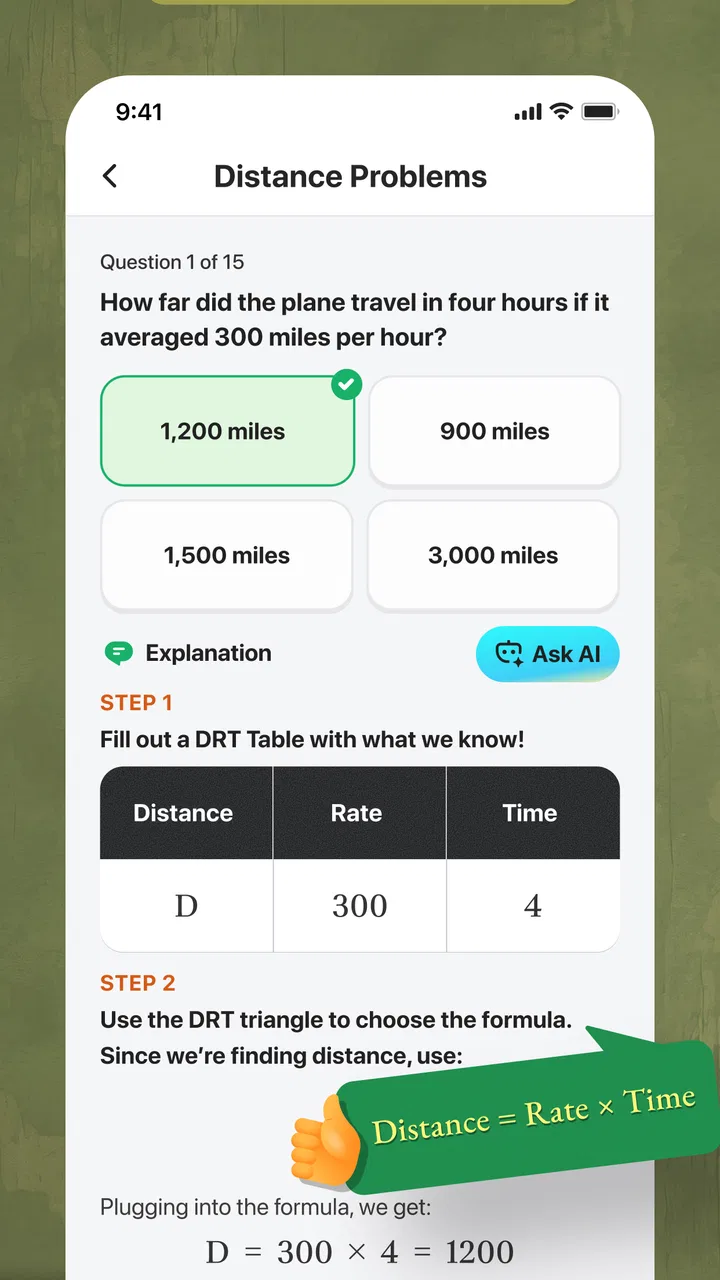
- Practice questions include explanations to help clarify incorrect answers.
- Timed quizzes help users build speed and manage test-day pressure.
- Progress tracking makes it easier to identify weaker subject areas.
- Short study sessions work well for learners preparing on a busy schedule.
Cons
- Some advanced features may require a paid subscription or in-app purchase.
- Question difficulty may not always match the official ASVAB exam closely.
- The app depends on regular updates to keep preparation content current.
- Explanations may feel brief for users who need detailed lessons.
- Ads or subscription prompts can interrupt study sessions in the free version.

2026 ASVAB Practice Test Prep
Gallery